ArrayUtil is an out-of-the-box script include that provides several handy functions for working with arrays. It’s documented here, but I think some functions aren’t explained clearly enough — so that’s the goal of this article.
ArrayUtil script include can be found at:
https://<your_instance_name>.service-now.com/nav_to.do?uri=sys_script_include.do?sys_id=fb32a2d8c0a80a6000e907036f484b5bArrayUtil requires an object to be created to access/call its functions.
If you’re writing a script in global scope, you can call it by name:
var arr = new ArrayUtil();If you need to call it from a custom scope, use its API name:
var arr = new global.ArrayUtil();This utility contains 9 methods, and this article covers four of the most useful:
ensureArrayconvertArraydiffunique
Try the example scripts in a background script for a quick test.
1. ensureArray — convert a JavaScript object into an array
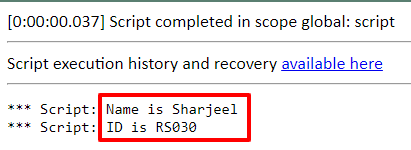
This function takes an object as a single parameter. It converts the object and returns it as a new array. Note it returns the whole object as a converted array at index 0.
Script
/*
StudentInfoObj --> Object Name
arr --> Object of ArrayUtil Class to access its function.
studentInfoArray --> Array converted from Object.

Please note - index starts at 0 in an Array.
*/

var studentInfoObj = { 'name': 'Sharjeel', 'id': "RS030" }

var arr = new ArrayUtil();
var studentInfoArray = arr.ensureArray(studentInfoObj  /*Object Name*/);

gs.info("Name is " + studentInfoArray[0]['name']);
gs.info("ID is " + studentInfoArray[0]['id']);
Output
2. convertArray — convert a Java object into an array
Script
// getMyGroups returns the logged-in user's groups as a Java object.
var myGroups = gs.getUser().getMyGroups();
gs.print(myGroups);

// print the type of myGroups object.
gs.print(Object.prototype.toString.call(myGroups));

// convert the Java object into an Array.
var convertedArr = new ArrayUtil().convertArray(myGroups);
gs.print(convertedArr);

// print the type of convertedArray.
gs.print(Object.prototype.toString.call(convertedArr));
Output
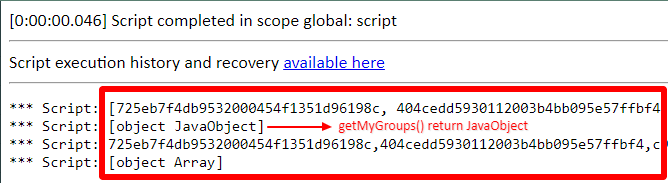
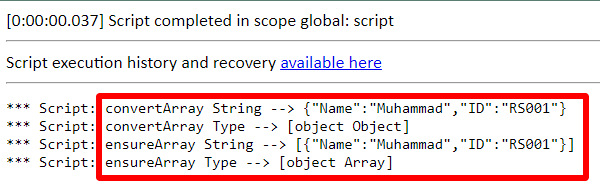
To understand the difference between ensureArray and convertArray, see the example below.
Script
// Javascript object NOT Java object
var studentInfo = {
  "Name" : "Muhammad",
  "ID": "RS001"
};

var arrayUtil = new ArrayUtil();

var cArray = arrayUtil.convertArray(studentInfo); // Array returned by convertArray method
var eArray = arrayUtil.ensureArray(studentInfo);  // Array returned by ensureArray method

gs.print('convertArray String --> ' + JSON.stringify(cArray));
gs.print('convertArray Type --> ' + Object.prototype.toString.call(cArray));

gs.print('ensureArray String --> ' + JSON.stringify(eArray));
gs.print('ensureArray Type --> ' + Object.prototype.toString.call(eArray));
Output
3. diff — remove duplicates between two or more arrays
This function takes two or more arrays as parameters and returns the elements found in the first array but not in the rest.
Script
/*
studentNames1  --> 1st Array of Names.
studentNames2  --> 2nd Array of Student IDs.
arr --> Object of ArrayUtil Class to access its function.
duplicatesRemoved --> Array of elements found in the first array but not in the second.

Please note - the array passed as the second parameter is appended/concatenated to the first.
*/

var studentNames1 = ['Muhammad', 'Sharjeel', 'Michael', 'Keshav'];
var studentNames2 = ['Sharjeel', 'Alex', 'Mubeen', 'Keshav'];

var arr = new ArrayUtil();
var duplicatesRemoved = arr.diff(studentNames1 /*1st Array*/, studentNames2 /*2nd Array*/);

gs.info("Student Concatenated Array --> " + duplicatesRemoved);
Output
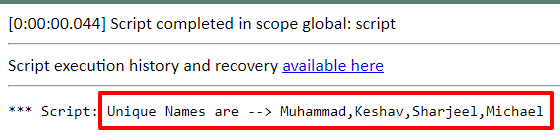
4. unique — remove duplicate elements in a single array
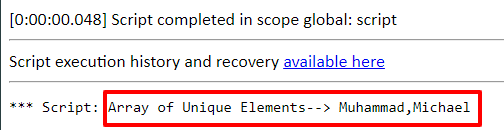
This function takes an array as a single parameter and returns the unique elements of the array (duplicates removed).
Script
/*
studentNames  --> Array of Names, contains duplicate values.
arr --> Object of ArrayUtil Class to access its function.
uniqueElements --> Array of unique elements, contains no duplicates.
*/

var studentNames = ['Muhammad', 'Sharjeel', 'Michael', 'Keshav', 'Sharjeel', 'Michael'];

var arr = new ArrayUtil();
var uniqueElements = arr.unique(studentNames /* Array Name */);

gs.info("Unique Names are --> " + uniqueElements);
Output
Reference: ArrayUtil API docs